Casual Watch Face2.0
Publisher Description
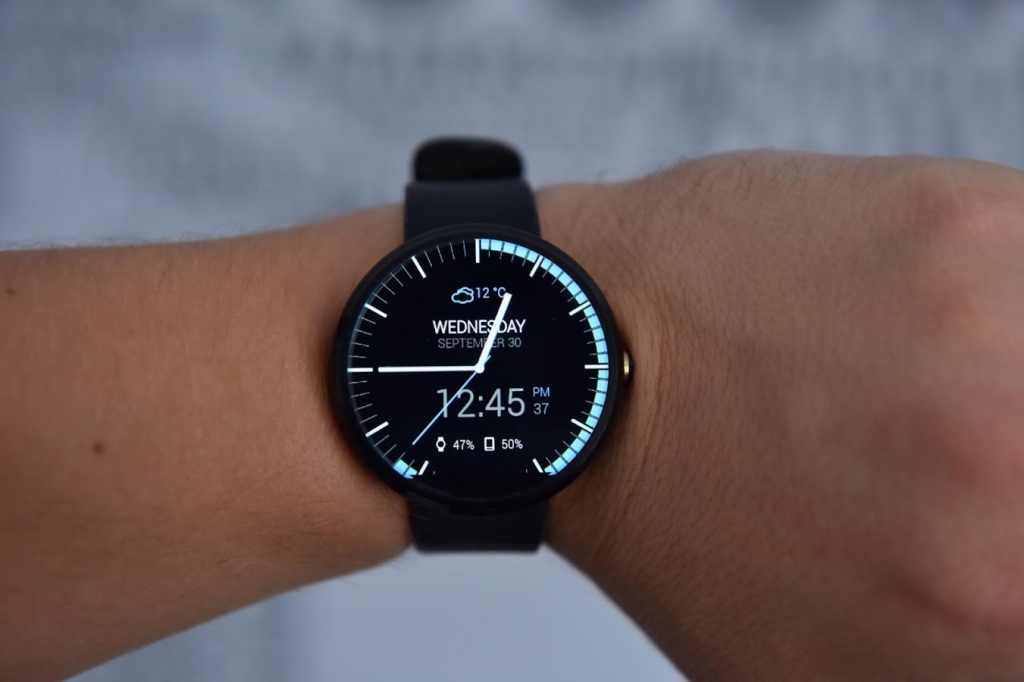
Casual Watch Face for Android made by RichFace.
Compatible with
• Motorola 360 (1st or 2nd gen)
• Huawei Watch
• LG Watch Urbane
• LG G Watch R
• TAG Heuer Connected
• Fossil Q Founder
• Sony Smartwatch
★★★ New tap features (Only for Android Wear 1.3!): ★★★
✔ Interactive options
✔ Weather forecast
✔ Material design colors on tap
★★★ Features ★★★
✔ Time, Date, Month
✔ Weather (with 2 weather providers)
✔ Battery indicator
✔ Phone battery level
★★★ Configuration ★★★
✔ Change hour format
✔ Custom color configuration
✔ Animation on/off
✔ Screen time
✔ Smooth seconds on/off
✔ 3 weather providers (OpenWeather, YR)
✔ Peek card settings
✔ OK Google position
Yahoo Weather in next update
To install:
1. After install run 'Resync app' on Android Wear App.
2. Long press your android wear watch and choose RichFace Casual as you watch face
Compatible with Moto360, LG Urbane, LG G Watch R and for square watches.
Check out our other watchfaces at: http://www.richface.watch
About Casual Watch Face
The company that develops Casual Watch Face is RichFace. The latest version released by its developer is 2.0.
To install Casual Watch Face on your Android device, just click the green Continue To App button above to start the installation process. The app is listed on our website since 2015-09-29 and was downloaded 3 times. We have already checked if the download link is safe, however for your own protection we recommend that you scan the downloaded app with your antivirus. Your antivirus may detect the Casual Watch Face as malware as malware if the download link to com.watch.richface.casual is broken.
How to install Casual Watch Face on your Android device:
- Click on the Continue To App button on our website. This will redirect you to Google Play.
- Once the Casual Watch Face is shown in the Google Play listing of your Android device, you can start its download and installation. Tap on the Install button located below the search bar and to the right of the app icon.
- A pop-up window with the permissions required by Casual Watch Face will be shown. Click on Accept to continue the process.
- Casual Watch Face will be downloaded onto your device, displaying a progress. Once the download completes, the installation will start and you'll get a notification after the installation is finished.
Program Details
System requirements
Download information
Pricing
Version History
version 2.0
posted on 2015-09-29
Interactive options,Weather forecast,Phone battery level,Material design colors on tap,Square design supported,Peek card settings,OK Google position
